

5.11. Miscellaneous
The Miscellaneous tab in the Project Settings dialog is illustrated below:
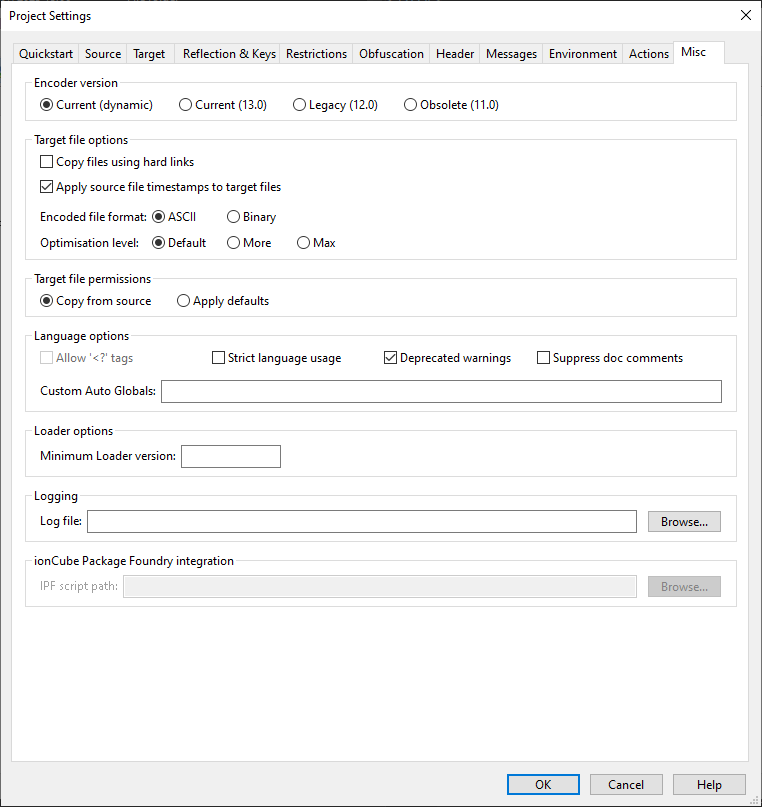
Encoder version
In this section, you can select which Encoder version you wish to use for encoding your files. For most users, the optimal setting is Current (dynamic). This ensures the Encoder from the most recently installed version is always used. Notably, when you upgrade to a future major version, this choice guarantees that the project will be used with the associated newer Encoder version and not just the updated GUI. However, if you're encoding for servers that lack the latest Loader or if you prefer to manually decide when to transition to a newer Encoder post-upgrade, you can opt for a specific earlier Encoder version. Remember, each GUI release includes Encoders for its specific version and the two preceding major versions.
- With the version 15 GUI, Current (15.0) is the standard Encoder. Choosing this option, when accessing a project with a newer software version in the future, the Encoder will remain at version 15, provided it's included in the package.
- Files encoded with 14.0 require at least a version 14.0.0 Loader. The project will always use a version 14 Encoder if it is available.
- Files encoded with 13.0 require a version 13.0.0 Loader at a minimum. The project will use Encoder version 13. However, when version 16 of the GUI is released, version 13 will no longer be included. Projects depending on this Encoder version will then require the selection of a more recent Encoder.
Note: Modifying this setting can nullify the target PHP version setting if there's no compatible Encoder for that PHP version (e.g. selecting the version 14 Encoders with PHP 8.4 selected). In such situations, the PHP language range will need to be reconfigured.
Target file options
The Encoder will set the modified time on target files to be the same as the modified time on the source files if Apply source file timestamps to target files is checked.
Files can be encoded in either ASCII or binary mode. Binary mode files are slightly smaller in size, however some FTP clients and compression tools may corrupt files by performing CR/LF (linebreak) conversion when transferring between or unpacking files on different operating systems. For this reason it is strongly recommended to select ASCII mode encoding. Please note that binary mode cannot be used if the project build uses bundling due to the language range chosen.
Target file permissions
The Encoder will apply the same permissions of the source files and folders to the target if Copy from source is selected.
Language options
Files starting with the conventional <?php tag are
recognised as PHP files. To also recognise the short open
tag <? check the corresponding option.
To display warnings where source code has violated PHP strict language usage guidelines or where it uses deprecated features, check the Strict language usage and/or Deprecated warnings options.
The Encoder can preserve any Documentation Comments such that these are available for reading programmatically. Storage of doc comments can be disabled by checking the Suppress doc comments box.
The Custom Auto Globals field allows you to specify
variables that should be treated as globals when used inside a
function even if no global keyword has been used.
The names should be comma separated, e.g. VAR1,VAR2.
The use of any globals in software should be kept to a minimum for maintainability, reliability and ease of understanding, but if your application uses any custom extensions that define autoglobals that your application relies upon, you can tell the Encoder about them via this field.
Encoder options
This feature allows additional Encoder command line options to be manually specified, although this would never be necessary in general.
Loader options
From time to time new features may be added to the ionCube Loader
such as new Loader API functions. If an encoded script requires such
features, it may be desirable to specify the minimum version of the
Loader compatible with the scripts. For example,
enter 10.2.0 in the Minimum Loader version to
prevent the encoded files from running with a Loader whose version is
less than 10.2.0, or 10.0 to prevent the files from
functioning with a Loader version prior to 10.0.
Logging
A log file can be created containing messages generated during the Encoding process. Enter the path to use when saving the log file in the Log file field.
ionCube Package Foundry integration
The ionCube Package Foundry (IPF) is a tool for producing
installers for your PHP applications. IPF is a separate tool to the
Encoder, and can be integrated with the Encoder GUI. IPF uses a script
to configure options such as the name of the product and properties
related to deployment, and to enable the integration it is necessary
to enter the path to an existing or new .pfs script.
IPF can also be run as a standalone application from the Windows Start Menu, and the IPF documentation should be consulted for more information.