

5.2. Source
The Source tab in the Project Settings dialog is illustrated below:
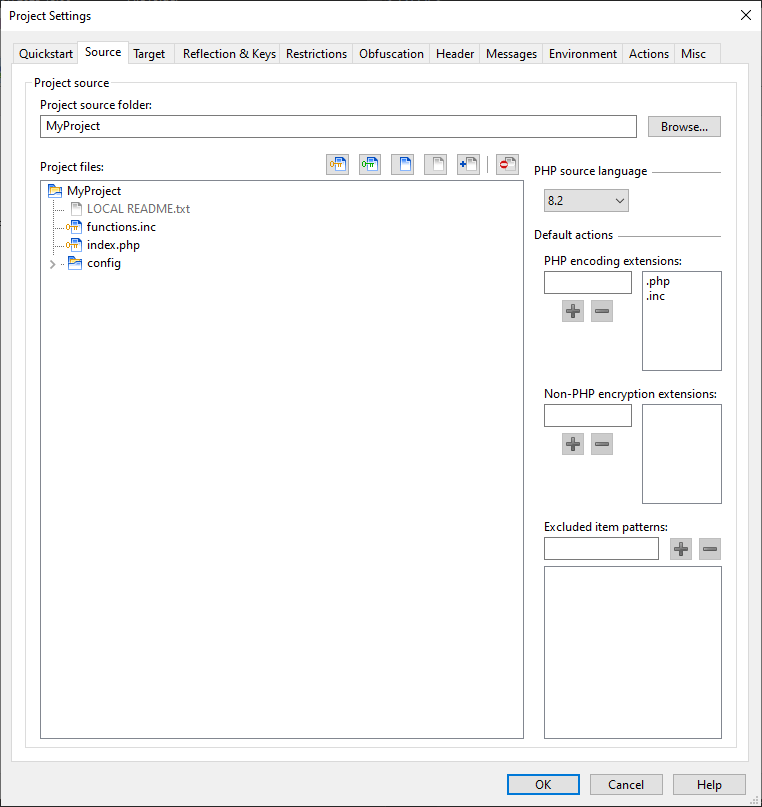
The Project source folder field contains the path of a folder containing files to be encoded. The contents of this folder and its subfolders are displayed in the Project files tree.
When encoding a project, the Encoder will perform one of three operations on each file; encoding PHP and HTML source, encrypting non-PHP contents, or just copying. Files and folders can also be excluded from being processed. Unless excluded, each processed file will be written within the target folder specified on the Target tab. Files are encoded based on the source language chosen.
How each file will be processed is first determined by configurable default rules. In addition, files and folders can be given custom settings, for example to copy a particular PHP file instead of encoding it. To change the defaults, simply right click on one or more files or folders and select an item from the popup context menu. For convenience, the buttons above the source tree can also be used to encode, encrypt, copy, exclude or re-include items back into the project.
The default rules for encoding and encrypting are based on the extensions in the PHP encoding extensions and Non-PHP encryption extensions list boxes. The Excluded item patterns list box specifies names or patterns of files or folders to exclude.
Encrypted files are processed using a strong symmetric block cipher, and it may be desirable to encrypt files such as templates in this way. The Loader API can be used to read and write files encrypted by the Encoder, and this is described further in the Encoder PDF sections on encrypted files and the Loader API.
Tree context menu options
File context menu:
- Open: open the file with the default application for the appropriate file type or preferred editor.
- Open With: open a file with a choice of application.
- Encode PHP file: set the item to be encoded as a PHP language source file.
- Encrypt non-PHP file: encrypt the file. The file can be read using the Loader API.
- Copy: set the file to be copied from the source folder to the target folder.
- Apply default actions: apply the file extension patterns to the item. An item not matching any extension pattern will be set to be copied.
- Exclude: set the file to be excluded from the project.
- Include: set the file to be included in the project.
- Skip: set the file to be ignored by the Encoder.
- Change default actions: a submenu to change the default rules based on the file extension.
Some menu items may be disabled based on the particular settings of each file.
Directory context menu:
- Open: open the directory with Windows Explorer.
- Encode contents: recursively set the folder contents to be encoded.
- Encrypt contents: recursively set the folder contents to be encrypted.
- Copy contents: recursively set the folder contents to be copied.
- Apply default actions: apply the file extension patterns recursively to the folder contents. Items not matching any extension pattern will be set to be copied.
- Exclude: recursively set the folder contents to be excluded from the project.
- Include: recursively set the folder contents to be included in the project.
- Skip: set the folder to be ignored by the Encoder.
- Change default actions: a submenu to change the excluded item patterns for excluding or not-excluding all directories of the same name.
- Expand all: expand the tree node and all children.
- Collapse all: collapse the tree node and all children.
Note: excluded folders are still scanned before encoding as there may be child items that are selected to be included in the project. For best performance when ignoring items, use the Skip feature instead.
Note: If a folder is set to be copied, encoded, encrypted or excluded, then items subsequently added to the folder will inherit the same properties.
PHP language range
As with the Quickstart tab, this specifies the minimum and maximum PHP runtime version you wish to support for the generated files. The selection determines which encodings will be performed, with files in some cases containing a Bundle of more than one encoding. Below the selection, the GUI shows which runtime versions of PHP are supported by the selection.
The minimum version should be chosen to be no lower than the PHP language version used by the source files. For example, files cannot be encoded for PHP 7 if they use syntax only available in PHP 8.
The maximum version sets the highest PHP version your files are
expected to run on. While files may still work on higher PHP versions, this
setting ensures no unnecessary encodings are added. For example, selecting
PHP 7.4 would exclude support for PHP 8.
Choosing --- ensures files are
encoded up to the maximum PHP version supported by the current
product version.
If files are re-encoded with a future product version, --- ensures
any required encodings for newer PHP versions are included.
The maximum supported runtime version may show as higher than that selected. This would be if the ionCube Loader runtime is able to process files encoded for an older version of PHP, such as the ionCube Loader for PHP 8.4 being able to process files encoded for PHP 8.2 or 8.3.